Budget vs Activity — What's the Difference?

If you use corporate cards in Custodia, you've probably seen both Budget and Activity (sometimes labeled Spend Permissions on dashboards). They sound similar — both involve money and limits — but they serve different jobs.
Budget is the organizational pool. Activity is the employee's spend permission.
Once you see that split, the rest of the product makes more sense: why finance tracks utilization in Budget Overview, why employees check Spend Permissions before swiping a card, and why a single expense can show both a budget and an activity.
The cake and the slice
The easiest way to remember the difference:
- Budget = the cake — the whole dessert your organization baked for a team, quarter, or project.
- Activity = your slice — the portion cut and handed to you so you know exactly how much you can eat, and when.
Finance manages the cake. Employees spend from their slice.
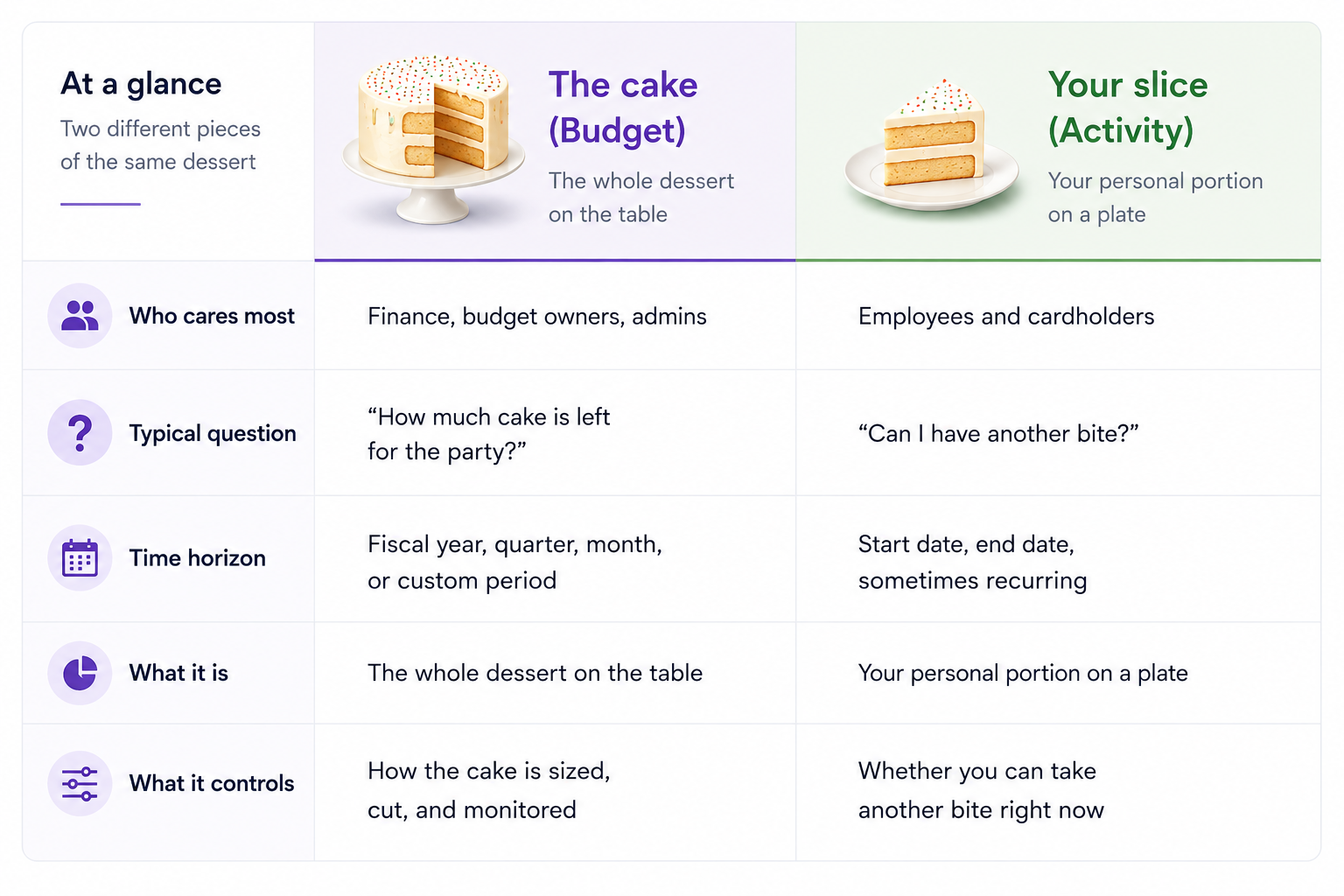
Think of it this way:
- Budget = the cake (the department's shared dessert)
- Activity = the slice on your plate (your permission to eat from it)
What is a Budget?
In Custodia, a budget is a financial container your organization sets up to plan and control spend.
Picture a cake at a team event:
- The whole cake is the budget amount — e.g. $50,000 for Sales Q2.
- Cutting it into tiers or slices is sub-budgets — Travel, Meals, Events, each with its own share of the cake.
- Cake still on the serving platter is remaining — not yet assigned to anyone.
- Slices set aside on side plates but not eaten yet is reserved — allocated to activities, waiting to be spent.
- Cake that's already been eaten is used — actual card transactions.
Finance doesn't track every crumb in real time. They watch the whole cake: how much is gone, how much is set aside, and how much is still available to cut.
What budgets contain
A budget typically has:
- An amount — the size of the cake
- A currency
- A period — annual, quarterly, monthly, or a custom date range
- An owner — often a budget owner responsible for that cake
- Status — such as active or archived
Budgets can be hierarchical. A top-level "FY 2026 Operations" cake might be cut into sub-cakes for teams, regions, or projects. Finance can see utilization roll up from sub-budgets to the parent.
What budgets track
Budget Overview surfaces metrics finance teams care about:
- Used — cake that's been eaten (money already spent on cards)
- Reserved — slices set aside on plates but not yet eaten (money allocated to activities but not yet spent)
- Remaining — cake still on the platter (still available in the budget pool)
That distinction matters. Reserved funds are spoken for — they've been cut and assigned to employee activities — but they haven't hit the card yet. Remaining funds are still free to portion out.
What budgets connect to
Budgets don't exist in isolation. Through budget mapping, a budget can be tied to scope dimensions such as:
- Activity type (e.g. Meals, Travel)
- Team
- Employee
- Cost center
- Subsidiary
- Expense type
Mapping rules answer: when someone spends under these conditions, which cake should it come from?
Some organizations also use a catch-all default budget — the "everything else" cake for spend that doesn't match a more specific rule.
Where you'll see budgets: My Budgets, Budget Overview, utilization charts, sub-budget management, reclaim flows, and on expense details as Budget.
What is an Activity?
In Custodia, an activity is a pre-approved spend permission — a slice of the cake placed on your plate so you can use your corporate card within defined limits.
On employee dashboards, the same concept often appears as Spend Permissions. Same idea, different screen.
You don't walk up to the whole cake and cut what you want. Someone cuts you a portion first.
What activities contain
An activity is much more operational than a budget. It usually specifies:
- Who can spend — you, or your group (whose plate is this?)
- How much — the size of your slice (activity amount / allocation)
- When — while the party's still on (activity start and end dates)
- What kind of spend — via an activity type (Meals, Travel, Client Entertainment, etc.)
- Limits — daily caps, single-transaction limits, card restrictions ("one bite at a time")
- Approval status — pending, approved, rejected, or auto-approved
Activity types are templates your company configures in the Policy Manager. When someone creates a new activity, they pick a type — and that type defines the rules, fields, and approval path.
What activities track
From the employee's perspective, an activity shows:
- Allocated — how big your slice is
- Used — how much you've eaten
- Available — what's still on your plate
Activities can be active, pending, expired, archived, or locked. Employees often filter Spend Permissions by status before a trip or client dinner.
What activities control
An activity is what the card actually checks at transaction time:
- Is this employee allowed to spend right now?
- Is there enough left on their plate?
- Does the merchant or expense type match?
- Does the transaction fit within daily or per-transaction limits?
If something doesn't match, the transaction may decline — and Custodia can surface a specific reason (budget limit, activity mismatch, policy block, and so on).
Where you'll see activities: Spend Permissions widget, Activities view, activity creation wizard, expense details as Activity, and approval workflows.
How budgets and activities work together
Budgets and activities are linked, but they are not the same thing.
The flow, step by step
- Finance bakes the cake — e.g. $50,000 for "Sales Team — Q2 Travel."
- Mapping rules say which cake to use — e.g. Travel activity type + Sales team → this cake.
- Someone cuts a slice — a budget owner or employee requests an activity, e.g. $2,000 for a conference trip.
- The slice moves from platter to plate — the $2,000 moves from remaining to reserved on the budget.
- The employee eats their slice — transactions draw down the activity's used amount and the budget's used amount.
- Didn't finish the slice? — unused funds can be reclaimed back to the platter (returned to the budget).
When creating an activity, the wizard can offer "Use one of my budgets" — explicitly cutting the slice from a cake the requester owns or has access to.
A simple example
Budget (cake): "Marketing — FY 2026" — $120,000 Activity (slice): "SXSW client dinners — Jordan" — $1,500, March 10–15, Meals activity type
Jordan doesn't swipe against "$120,000." Jordan swipes against their $1,500 slice.
Meanwhile, the marketing budget owner sees $1,500 reserved (and eventually used) against the larger cake.
On the expense receipt, you'll often see both: Budget & Activity — one line for which cake the money came from, one for which slice authorized the spend.
Who manages what?
Finance & budget owners → Budgets (the cake)
- Bake and size the cake (create top-level and sub-budgets)
- Assign budget owners
- Configure mapping rules (which spend draws from which cake)
- Monitor utilization — eaten, set aside, and still on the platter
- Reclaim unused slices back into the cake
Screens: My Budgets, Budget Overview
Employees & managers → Activities (the slices)
- Request a slice before a trip, event, or purchase
- Track what's on their plate — available, active, pending, or expired
- Spend within activity limits on a corporate card
- Attach receipts and complete expense details
Screens: Spend Permissions, Activities, My Dashboard
Admins → Both (via Policy Manager)
- Define which activity types exist and who can create them
- Set approval policies
- Enable or configure budget enforcement
- Control receipt rules, card limits, and other guardrails
Common misconceptions
"I have a budget, so I can spend freely"
Seeing the cake on the table doesn't mean you can cut yourself a piece. A budget is a pool. You still need an activity — someone has to put a slice on your plate, with the right amount and dates.
"My activity amount is the whole budget"
Your slice is a portion of the cake, not the whole thing. Many employees can hold activities against the same budget simultaneously. The budget tracks the sum; each activity tracks one individual slice.
"Reserved means spent"
Reserved = slices set aside on plates, not yet eaten. Used = actually consumed. Finance watches both to avoid cutting more cake than exists.
"Activity type and activity are the same"
An activity type is the kind of slice (Travel, Meals). An activity is a specific instance: your $800 travel slice for next week's trip. Budget mapping often references activity types; employees work with activity instances.
"Budgets and activities are optional"
Depends on your company's policy. Some orgs require activities for all card spend. Others use budgets primarily for reporting. Custodia supports both strict enforcement (via Policy Manager) and lighter tracking — but the concepts remain distinct.
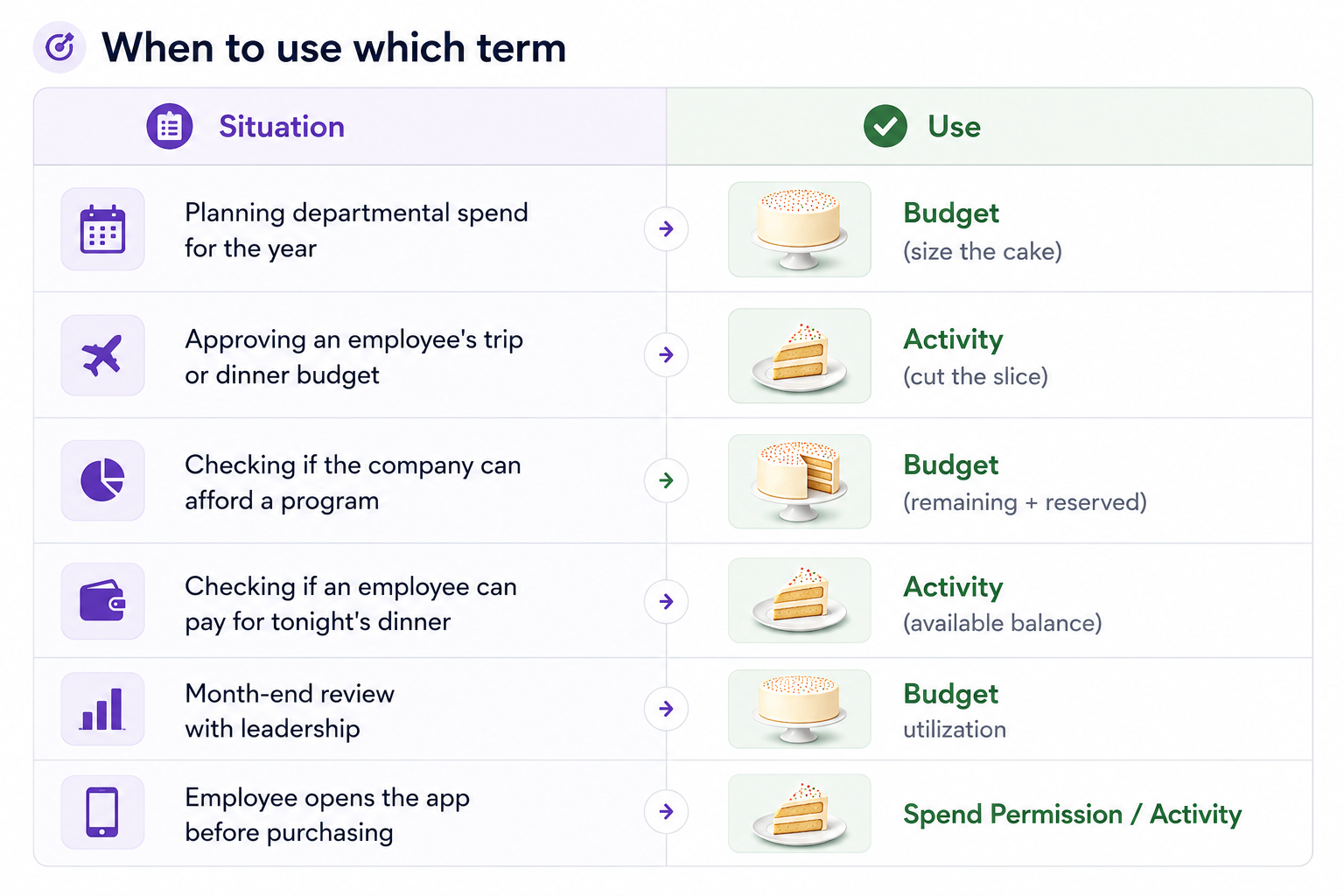
Putting it all together
If you remember just one thing, remember the cake.
The Budget is the whole cake—the total amount Finance manages, allocates, and monitors across the organization.
The Activity is your slice—the portion of that cake reserved for you, giving you permission to spend within approved limits.
Finance keeps track of the entire cake by monitoring Remaining, Reserved, and Used funds. Employees don't spend from the whole cake—they spend only from the slice that's been allocated to them.
Custodia connects these two concepts seamlessly, giving Finance complete visibility and control while making spending simple and intuitive for employees.
The Budget is the cake. The Activity is your slice. Once you understand that, the rest of Custodia starts to make perfect sense.

Please sign in to leave a comment.
Comments
0 comments